
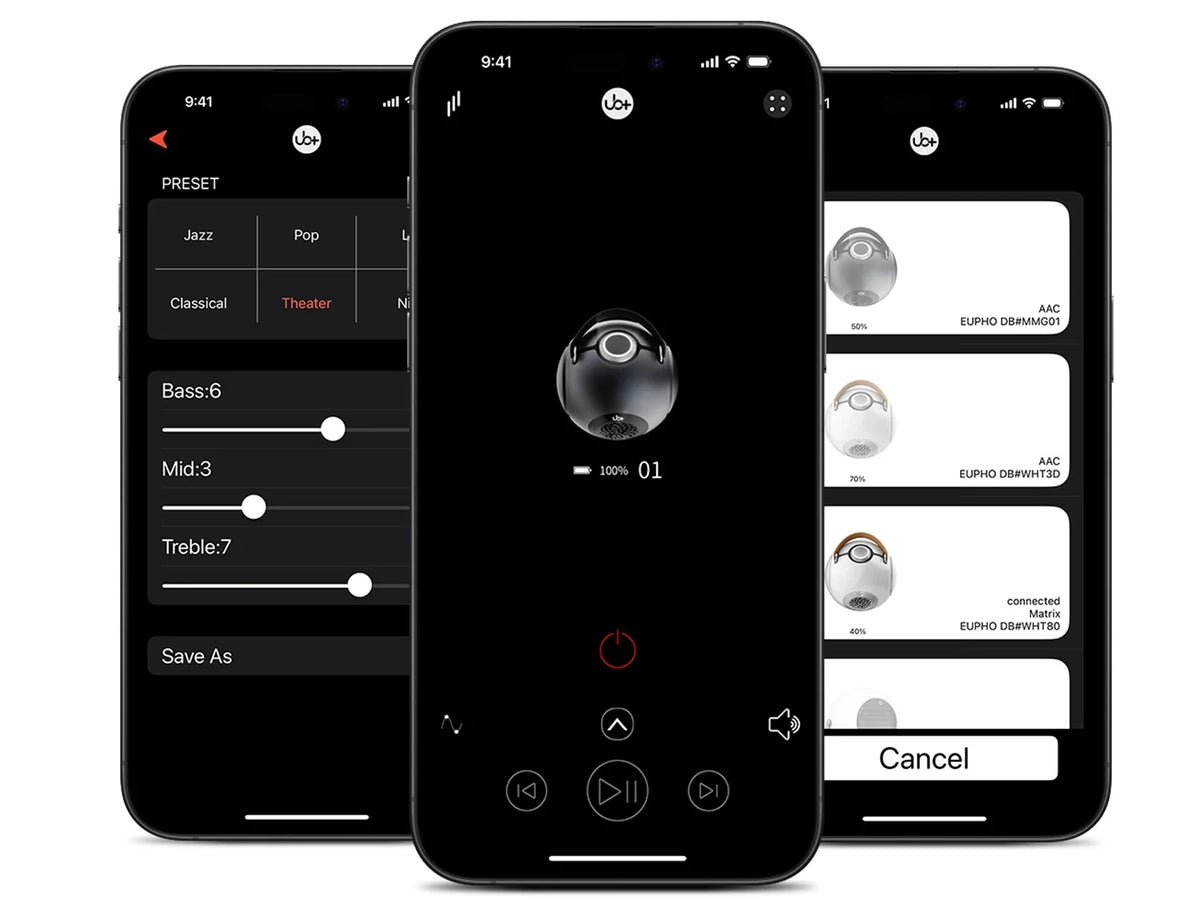
A Bluetooth speaker with companion app support can offer more control over your listening experience than a speaker that relies entirely on physical buttons. Depending on the model, its companion app may provide equalizer (EQ) adjustments, sound presets, connection settings, firmware updates, or other controls that help you personalize how the speaker performs.
But does having an app actually make a speaker sound better? And is customizable EQ worth paying extra for?
The answer depends on what the app allows you to change, how effectively the speaker responds to those adjustments, and whether you will use the features regularly. An app with useful sound controls can help you adapt a speaker to different music genres, listening volumes, and environments. An app that offers little beyond basic playback information may add convenience without delivering much practical value.
The most important distinction is between having an app and having meaningful control over your audio. A well-designed companion app should give you useful options without making everyday listening unnecessarily complicated.
For buyers comparing portable speakers, premium wireless audio systems, and compact Bluetooth models, this guide explains which app features genuinely matter, how equalization works, what companion apps cannot fix, and when paying extra for software-controlled sound makes sense.
What you will learn:
- What a Bluetooth speaker companion app actually does.
- How EQ changes bass, midrange, and treble.
- Which app features are worth paying for.
- When customizable EQ improves everyday listening.
- The limitations of software-based sound adjustments.
- How to evaluate app compatibility, usability, and long-term support.
- What to consider before buying a speaker with advanced sound controls.
What Is a Bluetooth Speaker Companion App?

A companion app is software designed to work with a compatible speaker, usually through a wireless connection. It provides additional controls or information that may not be accessible through the speaker's physical buttons alone.
The exact features vary by manufacturer and model. Some apps focus on equalization, while others provide a wider collection of settings.
A companion app may offer:
- Equalizer controls: Adjust bass, midrange, and treble or select predefined sound profiles.
- Sound presets: Switch between configurations intended for different music styles or listening situations.
- Speaker settings: Manage supported device-specific options.
- Firmware updates: Install software updates when the manufacturer provides them.
- Connection or pairing features: Access supported connection and multi-speaker settings.
- Device information: View certain details about the connected speaker, where supported.
Not every app includes all these capabilities. Before buying, check the actual feature list for the specific speaker rather than assuming that every companion app offers advanced EQ or firmware management.
For a practical overview of app-based audio controls, see UB+'s guide to Bluetooth speaker EQ apps.
What Is EQ Control, and Why Does It Matter?

EQ stands for equalization. It changes the relative level of different frequency ranges in an audio signal.
Instead of listening to a speaker with only its default tuning, EQ lets you adjust the tonal balance to match your preferences, recordings, and listening environment.
Most music contains three broad frequency regions that listeners commonly associate with bass, midrange, and treble.
|
Frequency Region |
What You Generally Hear |
What EQ Adjustments Can Change |
|
Bass |
Kick drums, bass guitar, low synthesizers, and low-frequency weight |
Perceived fullness, impact, or boominess |
|
Midrange |
Vocals, guitars, piano, many instruments, and much of speech intelligibility |
Vocal presence, warmth, and clarity |
|
Treble |
Cymbals, high-frequency detail, consonants, and brightness |
Perceived crispness, detail, or harshness |
These categories overlap, and exact frequency boundaries vary depending on how an equalizer is configured.
The point of EQ is not to make every frequency louder. It is to adjust the balance so the speaker sounds more suitable for the material and environment.
Why Adjustable EQ Is Useful
A speaker's default tuning is a design decision. Some models emphasize bass for an energetic presentation; others aim for a more restrained balance. EQ allows compatible speakers to offer more than one listening profile.
For example:
- Bass-heavy music: A modest low-frequency adjustment may create a fuller presentation if the speaker has sufficient bass capability.
- Podcasts and spoken audio: Reducing excessive bass or adjusting the vocal range may make speech easier to understand.
- Acoustic music: Small tonal adjustments may help instruments sound more natural to your ears.
- Low-volume listening: A different tonal balance may preserve the sense of fullness when listening quietly.
- Different rooms: Adjustments may help compensate for some tonal preferences or room-related effects.
However, EQ is not a universal correction tool. The results depend on the speaker's capabilities, available adjustment range, and the particular problem you are trying to address.
Is EQ Control Worth Paying Extra For?
For many buyers, EQ is one of the most useful features in a companion app—but only when the controls offer meaningful flexibility.
The real value comes from being able to change the sound in ways you can hear and prefer. Simply having a graphic equalizer on a phone screen does not guarantee better audio.
When EQ Is Worth It
Customizable EQ may be worth prioritizing if:
- You listen to several genres with different tonal requirements.
- You sometimes find the default bass too strong or too weak.
- You listen to podcasts and music through the same speaker.
- You use your speaker in different rooms.
- You prefer personalizing sound rather than accepting a fixed tuning.
- You regularly listen at both quiet and moderate volume levels.
For these listeners, a well-implemented EQ can increase a speaker's flexibility without requiring a different device for every situation.
When EQ May Not Be Worth Paying More For
You may not need an advanced app if:
- You already enjoy the speaker's default sound.
- You rarely change audio settings.
- The app offers only a few presets that do not suit your preferences.
- You mainly use the speaker for occasional background music.
- The app is difficult to navigate or unreliable.
- The feature set duplicates controls you already have elsewhere.
The best buying decision is based on useful functionality, not the number of options listed on a product page.
Companion App EQ vs. Your Phone's Equalizer
One of the most important buying questions is whether you actually need the speaker manufacturer's app to adjust sound.
Depending on the source device and software, your phone, music app, or computer may already provide EQ. A speaker companion app can therefore be an additional control layer rather than the only way to customize sound.
The two approaches are not necessarily interchangeable, however.
|
Consideration |
Speaker Companion App |
Phone or Music App EQ |
|
Main purpose |
Controls supported speaker-specific features |
Adjusts audio through the source device or playback software |
|
Availability |
Depends on speaker compatibility |
Depends on the phone, operating system, or music app |
|
Speaker-specific settings |
May offer them |
Usually limited to the source's audio controls |
|
EQ functionality |
Varies by speaker and app |
Varies by device and software |
|
Use with multiple playback sources |
Depends on how the speaker implements the settings |
May apply only to audio played through that device or app |
|
Firmware management |
May be available |
Generally not provided by a music app's EQ |
|
Ease of use |
Convenient when integrated well |
Convenient if you already use the source device's controls |
The most important question is where the adjustment takes place and which audio sources it affects.
For instance, an equalizer built into a particular music app may affect only playback through that app. A speaker-specific setting may work differently depending on the product's implementation.
Before paying extra for a companion app, determine whether you need its unique features or simply want basic tonal adjustments that another compatible tool already provides.
How EQ Changes Bass, Midrange, and Treble
An equalizer is most useful when you understand what each adjustment is likely to do.
Large, indiscriminate changes can make sound less balanced. Smaller adjustments are often a better starting point, especially when you are unfamiliar with the speaker's tuning.
Adjusting Bass Without Making Music Boomy
Increasing bass can make music sound fuller, especially when a speaker's default response seems light. However, excessive boosting can make low notes overwhelm vocals and instruments.
On a compact speaker, large low-frequency boosts can also demand more from the driver and amplifier. Depending on the design and playback level, this may lead to increased distortion, compression, or reduced headroom.
A sensible approach is to:
- Make small adjustments rather than immediately raising the bass to maximum.
- Compare the sound using familiar recordings.
- Listen for definition instead of simply chasing stronger impact.
- Reduce bass if vocals become obscured or the sound turns boomy.
- Avoid forcing very low frequencies from a speaker that cannot reproduce them effectively.
EQ can reshape the response within a system's capabilities, but it cannot create unlimited bass extension from a physically limited driver and enclosure.
Improving Vocal Clarity With Midrange Adjustments
The midrange contains much of the information needed to understand speech and recognize the character of many instruments.
If vocals sound recessed, you may prefer a slightly different midrange balance. If voices are already forward or nasal-sounding, further boosting the same region may make them less comfortable.
When adjusting midrange EQ:
- Start with speech or a vocal track you know well.
- Change one control at a time.
- Avoid boosting multiple neighboring bands aggressively.
- Compare the adjusted sound with the original setting.
The goal is intelligibility and balance, not making every voice louder or brighter.
Managing Treble Without Adding Harshness
Treble adjustments affect the perceived brightness and high-frequency detail of music. Increasing treble can make a speaker sound more open to some listeners, but too much can emphasize sibilance, recording flaws, or harshness.
Reducing treble may make a bright recording more comfortable, although excessive reduction can also remove useful detail.
The ideal setting depends on the speaker, recording, listening volume, and your preferences.
Can EQ Make a Cheap Speaker Sound Premium?
EQ can improve a speaker's tonal balance, but it cannot fix every limitation in its construction or acoustic design.
A speaker may sound more satisfying after a small adjustment, especially if its default response does not match your taste. However, an equalizer cannot transform the speaker's physical capabilities.
EQ cannot reliably solve:
- Mechanical rattling from loose components.
- Severe driver distortion at high output.
- Insufficient maximum sound pressure level.
- Physical limitations on bass extension.
- Poorly controlled cabinet vibration.
- Every room-related acoustic problem.
The distinction is important because exaggerated equalizer settings can sometimes disguise one problem while creating another.
A useful companion app gives you control over the sound without encouraging adjustments that push the speaker beyond its operating limits.
For a broader look at how construction and engineering influence audio performance, read UB+'s guide to why some speakers sound better than others.
EQ Cannot Replace Good Acoustic Engineering
Software-controlled sound is only one part of speaker performance. The driver, amplifier, enclosure, and any ports or passive radiators determine what the system can physically reproduce.
A well-designed speaker begins with an acoustic system that works within its intended limits. EQ then provides another way to adjust the result.
What Matters Beyond the App
When comparing Bluetooth speakers, consider:
- Driver performance: The driver must reproduce the intended frequency range without excessive distortion.
- Enclosure design: The cabinet affects the driver's operating conditions and the system's low-frequency behavior.
- Amplifier capability: The amplifier must provide suitable output without routinely clipping.
- Bass architecture: Ports, passive radiators, and enclosure tuning influence low-frequency response.
- DSP implementation: Digital processing can support tonal balance and component protection.
- Maximum clean output: The speaker should deliver enough usable volume for your listening environment.
An app cannot compensate indefinitely for an undersized driver or inadequate amplification. Good engineering establishes the foundation; EQ helps personalize the experience.
For a closer look at the specifications that matter, read UB+'s article on seven important speaker specifications.
Other Companion App Features Worth Considering
EQ may be the main reason you want an app, but other features can add practical value. The important thing is to confirm that the speaker you are considering actually supports them.
Sound Presets
Presets provide ready-made tonal configurations. They can be convenient if you do not want to adjust individual frequency bands.
However, presets are not automatically better than the default setting. Their value depends on whether they suit your music and preferences.
Firmware Updates
Some manufacturers offer firmware updates through a companion app. These can provide supported software improvements or fixes, depending on the product.
Before purchasing, check whether updates are offered for the specific speaker and how the manufacturer manages them. An app should not be assumed to provide regular improvements simply because it exists.
Multi-Speaker Features
Some compatible systems allow users to manage stereo pairing or other multi-speaker functions through an app. Availability and operation vary substantially by model.
If you want to pair two speakers or create a more flexible listening setup, confirm how the feature works and whether it supports the exact models you intend to use.
Speaker Settings and Device Information
Some apps expose settings or product information that would otherwise be difficult to access. These controls can improve convenience when they are relevant to your usage.
However, extra menus are not inherently valuable. A good app prioritizes useful functions and makes common adjustments easy to locate.
What Makes a Companion App Good?
A companion app should make a speaker easier to use, not turn everyday listening into a technical project.
Before buying, evaluate the app in terms of usability, compatibility, and actual control over the audio.
|
App Quality |
What to Check |
Why It Matters |
|
Compatibility |
Supported speaker models, operating systems, and device requirements |
Prevents discovering after purchase that the app will not work with your setup |
|
EQ flexibility |
Available bands, adjustment range, and presets |
Determines how much control you have over tonal balance |
|
Ease of use |
Clear menus and accessible everyday controls |
Makes adjustments quicker |
|
Reliability |
Connection stability and consistent settings |
Reduces frustration during normal use |
|
Feature relevance |
Whether the app offers controls you will actually use |
Helps determine whether the extra software adds value |
|
Support |
Manufacturer documentation and update information |
Helps you understand what happens after purchase |
|
Permissions and privacy |
Requested permissions and available privacy information |
Lets you evaluate what access the app needs |
A sophisticated-looking interface is not enough. The best companion app is one that works reliably with the speaker and offers features that genuinely improve your experience.
Does an App Affect Bluetooth Sound Quality?
Not necessarily. The existence of a companion app does not automatically make a Bluetooth speaker sound better.
Audio quality depends on several factors, including the original recording, source device, wireless transmission, codec support, digital processing, speaker hardware, and the acoustic environment.
EQ changes can alter tonal balance, but the result depends on how and where the equalization is applied.
A well-designed companion app can make a real difference when it provides useful controls. However, a speaker with excellent default tuning may sound better to you than another speaker offering extensive EQ options.
Do not assume that an app improves wireless transmission quality, reduces latency, or upgrades a speaker's underlying hardware. Such functions require specific support and should be verified for the individual model.
Bluetooth Speaker With Companion App vs. Speaker Without an App
A speaker without a dedicated app can still deliver excellent sound. The deciding factor is not the presence of software but the performance of the complete product.
|
Buying Consideration |
Speaker With Companion App |
Speaker Without a Dedicated App |
|
Sound adjustment |
May provide speaker-specific EQ and presets |
May rely on default tuning or source-device EQ |
|
Convenience |
Can provide additional controls in one interface |
Often offers a simpler setup |
|
Customization |
Depends on the app's feature set |
Depends on physical controls and compatible external software |
|
Updates |
May support app-managed firmware updates |
Update options depend on the manufacturer's design |
|
Complexity |
May introduce more settings and compatibility requirements |
Often has fewer software requirements |
|
Long-term dependence |
Some features may rely on continued app support |
Basic operation may require fewer software dependencies |
|
Best for |
Listeners who value supported app-based controls |
Listeners who prefer simple, reliable operation |
Neither option wins for every buyer. If you frequently personalize sound, an app may be a useful advantage. If you prefer a speaker that works immediately without additional setup, simple physical controls may be more appealing.
How to Get Better Sound From a Companion App
You do not need to become an audio engineer to use EQ effectively. A few consistent habits can help you find settings that suit your preferences.
Start with the default setting. Listen to familiar music before making adjustments so that you have a reference point.
Change one thing at a time. Adjust bass, midrange, or treble separately rather than making several large changes at once.
Use a variety of recordings. A setting that sounds good on electronic music may not suit vocals, acoustic instruments, and spoken audio equally well.
Test at your usual volume. EQ preferences can change with listening level, so test the settings where you normally use the speaker.
Avoid excessive boosts. Large increases may reduce available headroom and increase distortion, depending on the system.
Keep a preferred baseline. If the app supports saved profiles, use them to return to a known setting instead of continually making adjustments.
Recheck placement. Moving a speaker away from a wall or corner may improve bass balance more effectively than applying a large EQ correction.
These steps help you distinguish between a tonal adjustment that genuinely improves listening and one that merely makes a particular frequency range louder.
Who Should Buy a Bluetooth Speaker With a Companion App?
A speaker with a companion app is most attractive to buyers who want meaningful control over the way their music sounds.
It May Be Worth It If You:
- Listen to several music genres and prefer different tonal balances.
- Like adjusting bass and treble to match your preferences.
- Use the speaker in different rooms or environments.
- Want supported speaker-specific settings or firmware management.
- Enjoy personalizing your audio rather than relying exclusively on default tuning.
It May Not Be a Priority If You:
- Prefer the sound of a speaker straight out of the box.
- Rarely adjust audio settings.
- Already have the EQ features you need in your source device.
- Want the simplest possible setup.
- Find the app's available adjustments too limited to make a noticeable difference.
The important question is not whether a companion app sounds like a premium feature. It is whether its specific functions solve a problem you actually have.
How to Compare Companion App Features Before Buying
Before purchasing a Bluetooth speaker, read the product details and determine what the app can do with that particular model.
Check these points:
- Does it offer adjustable EQ or only fixed presets?
- Can you adjust individual frequency bands?
- Are settings saved or retained when the app is closed, and under what conditions?
- Does the app support your phone and operating system?
- Are firmware updates available for the speaker?
- Does the app require account registration or particular permissions?
- Can the speaker's basic functions still be used without opening the app?
- Are the promised features available now, rather than merely described as future possibilities?
Do not assume that all settings remain active after disconnecting the phone or switching devices. That behavior depends on the product's implementation.
For buyers considering the UB+ range, the best approach is to review the relevant product and app information together. Do not assume that every feature described for one speaker or app version is supported by every model.
Frequently Asked Questions
Is a Bluetooth speaker with a companion app worth buying?
It can be worth buying if the app provides features you will actually use, especially adjustable EQ, useful presets, or supported speaker settings. If you prefer the default sound and rarely change audio controls, a speaker without a dedicated app may be equally suitable.
Does a Bluetooth speaker EQ app improve sound quality?
An EQ app can improve the sound to your preferences by changing the relative level of bass, midrange, and treble. However, it does not automatically improve every aspect of audio quality or overcome physical limitations in the speaker.
What is the most useful feature in a speaker companion app?
For many listeners, adjustable EQ is one of the most useful features because it allows personal sound customization. Other functions, such as firmware updates or multi-speaker settings, may also be valuable when they are supported and relevant to your setup.
Can EQ make a small Bluetooth speaker produce deeper bass?
EQ can increase the relative level of low frequencies within the speaker's capabilities, but it cannot create unlimited bass extension. Excessive bass boosting may increase driver excursion, distortion, or compression.
Is a speaker with an app better than one without an app?
Not necessarily. A speaker without a companion app can have excellent default tuning and sound quality. App support is an additional feature, not a guarantee of better hardware or better audio.
Pay for Useful Control, Not Just an App
A Bluetooth speaker with companion app support can provide meaningful value when it gives you practical control over sound and speaker settings. Adjustable EQ is particularly useful for listeners who enjoy different music genres, prefer a personalized tonal balance, or use the same speaker in multiple environments.
However, app support should not distract you from the fundamentals. Driver quality, acoustic design, distortion behavior, usable output, and default tuning determine much of the listening experience. An equalizer can refine a well-designed speaker's sound, but it cannot replace good engineering.
Before paying extra, compare the companion app's actual features with the controls already available through your phone or music software. Choose the system that offers the right balance of sound quality, convenience, and flexibility for your listening habits.
Explore the UB+ dB1 DoubleBass, compare it with the UB+ dB Mini, read the guide to Bluetooth speaker EQ apps, or review available UB+ speaker options.
The best companion app is not the one with the most settings. It is the one that helps you get the sound you want, quickly and reliably, from a speaker that already meets your needs.


Commenta
Questo sito è protetto da hCaptcha e applica le Norme sulla privacy e i Termini di servizio di hCaptcha.