
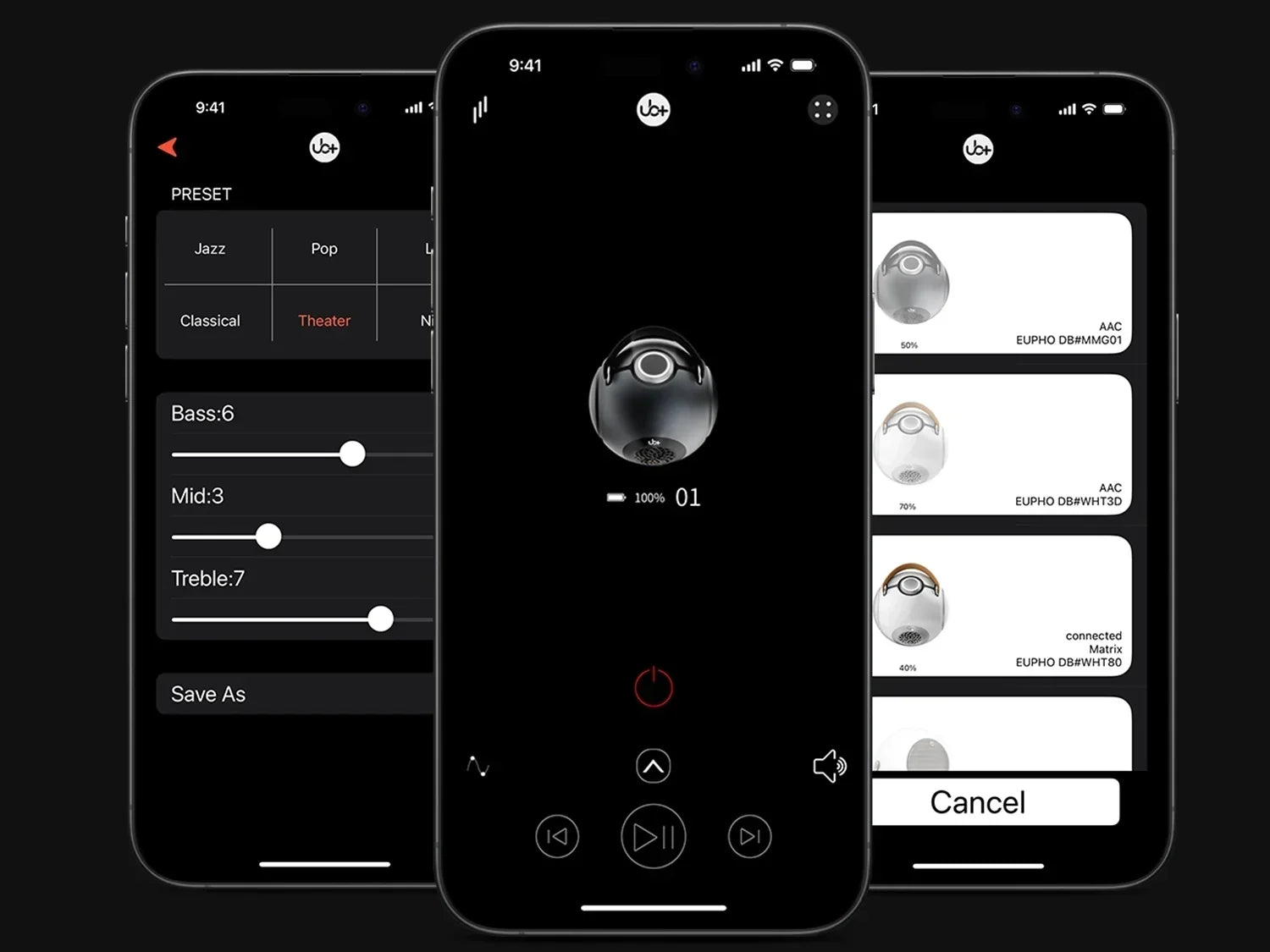
The bluetooth speaker EQ app experience matters when a speaker needs to perform across different rooms, genres, and listening levels. An equalizer lets you change the relative level of different frequency ranges instead of accepting one fixed tuning. With the UB+ SEEK app, EQ adjustments can be used to shape bass, midrange, and treble according to the recording and listening environment while keeping the speaker's physical acoustic system responsible for producing the underlying sound.
For listeners considering a Bluetooth speaker with EQ control, the useful question is not how much bass an app can add. It is how intelligently EQ can be used to make an already capable acoustic system better suited to a particular listening situation.
What Does EQ Actually Do?

EQ, or equalization, changes the relative level of selected frequency ranges.
In practical terms:
- Lower frequencies influence perceived bass.
- Mid frequencies contain much of the information that defines vocals and many instruments.
- Higher frequencies contribute detail, attack, and perceived brightness.
Increasing a frequency band makes that region more prominent relative to the rest of the signal. Reducing it has the opposite effect.
This means an EQ should be treated as a tonal adjustment tool, not a replacement for speaker engineering.
A poorly designed speaker cannot become a high-performance acoustic system simply by applying a large bass boost. EQ works best when it is used to refine the presentation within the physical capabilities of the speaker.
Why EQ Matters With a Portable Bluetooth Speaker
A portable speaker rarely operates in one environment.
The same speaker may be used:
- On a desk
- In a bedroom
- In a living room
- Outdoors
- While traveling
- At a low listening level
- At higher volume during a gathering
Each situation can change the way the listener perceives the frequency balance.
Room boundaries can reinforce certain bass frequencies. Open outdoor spaces remove much of that reinforcement. A speaker placed near a wall can sound different from the same speaker positioned in the center of a room.
EQ gives the listener a way to compensate for preference and listening context.
That makes a Bluetooth speaker EQ app particularly useful for people who do not want one fixed sound profile for every situation.
EQ Is Not the Same as Bass Generation
This distinction is especially important with the UB+ dB1 DoubleBass.
The speaker's acoustic architecture is designed around a patented spherical acoustic chamber inspired by Helmholtz Resonance.
The central 4.5-inch long-stroke mid-bass driver fires downward into the spherical chamber. Changes in internal air pressure activate two symmetrical passive radiators positioned on opposing sides.
Their combined surface area is approximately 3.5× larger than the active woofer.
The opposing passive radiators create a self-cancelling vibration architecture, helping reduce unwanted cabinet movement while directing mechanical energy toward acoustic output.
This produces mechanical bass amplification through the physical acoustic system.
The driver assembly includes a 90 mm oversized neodymium magnet, 35 mm long-stroke voice coil, 20 mm piston movement, 18 mm extra-wide surround, and aluminum shorting ring. The system is specified at approximately 40 Hz–20 kHz and around 93 dB SPL.
The onboard DSP monitors and manages system operation, but the fundamental low-frequency architecture does not depend on simply generating artificial bass through software.
EQ therefore serves a different purpose.
It changes the balance of the music reaching the system. It does not replace the physical mechanism that creates the speaker's bass.
How Bass EQ Changes What You Hear
Bass is not one single frequency.
Different low-frequency ranges affect the presentation differently.
|
Frequency region |
Perceived effect |
|
Deep bass |
Weight, sub-bass sensation |
|
Upper bass |
Warmth and body |
|
Lower midrange |
Fullness and thickness |
|
Midrange |
Vocals and instrument presence |
|
Upper midrange |
Attack and intelligibility |
|
Treble |
Detail and brightness |
A listener who says "I want more bass" may actually be responding to a lack of warmth, body, or low-end weight.
Simply increasing every low-frequency region can make the sound thicker without making it better.
A more controlled EQ adjustment targets the part of the spectrum that is actually missing from the preferred presentation.
Start With a Flat or Neutral Setting
Before creating a custom profile, start from the application's neutral or default EQ position.
Listen to several familiar tracks.
Choose recordings you know well rather than unfamiliar music.
Pay attention to:
- Vocal position
- Bass weight
- Kick-drum definition
- Instrument separation
- High-frequency detail
- Overall tonal balance
This gives you a reference.
If you immediately raise multiple bands, it becomes difficult to determine which adjustment actually improved the sound.
A good EQ process is incremental.
EQ Profile 1: Balanced Everyday Listening
For general listening, the objective is usually not maximum bass.
A balanced profile keeps bass present while preserving vocal clarity and high-frequency detail.
This works well for:
- Pop
- Rock
- Acoustic music
- Podcasts
- Everyday playlists
- Background listening
Instead of pushing every low-frequency band upward, make small changes and listen for whether bass becomes more defined or simply louder.
If vocals begin to sound recessed, the bass adjustment is probably too aggressive.
EQ Profile 2: Bass-Forward Music
A bass-oriented profile can be useful for electronic music, hip-hop, modern pop, and recordings where low-frequency energy is central to the production.
The mistake is assuming that maximum bass equals maximum enjoyment.
Excessive low-frequency boosting can:
- Reduce vocal clarity
- Mask instruments
- Increase perceived muddiness
- Consume additional system headroom
- Reduce the usable volume before audible compression or limiting
A better approach is a moderate bass increase followed by careful listening to the midrange.
The goal should be more weight without sacrificing definition.
EQ Profile 3: Vocal and Podcast Clarity
Music is not the only reason to use a speaker.
Podcasts, interviews, audiobooks, and spoken content benefit from a different tonal priority.
Here, excessive bass can work against intelligibility.
A useful voice-oriented profile emphasizes clarity rather than low-frequency weight.
Listen for:
- Consonants
- Speech articulation
- Vocal presence
- Background noise
- Natural voice tone
Do not make the voice unnaturally bright simply because it sounds more detailed at first.
The best setting is the one that makes speech easy to follow over long listening periods.
EQ Profile 4: Outdoor Listening
Outdoor listening presents a different acoustic environment.
Walls and ceilings are no longer reinforcing the sound.
Wind, distance, and ambient noise can also reduce the perceived impact of certain details.
For outdoor use, a modest tonal adjustment may make the speaker feel more balanced.
The temptation is to increase bass dramatically because the open environment appears to reduce low-frequency impact.
However, the speaker still has physical limits.
A sensible EQ profile should prioritize useful acoustic output rather than forcing the system to operate beyond its comfortable range.
EQ Profile 5: Low-Volume Night Listening
Human hearing does not perceive every frequency equally at every volume.
At lower listening levels, bass and treble can seem less prominent relative to the midrange.
A modest tonal adjustment can make quiet listening feel fuller.
This is useful for:
- Bedrooms
- Late-night listening
- Office environments
- Apartment living
- Background music
The objective is not to recreate party-level bass at low volume.
It is to maintain a satisfying tonal balance without excessive output.
Why Room Placement Should Come Before Heavy EQ
Before changing an EQ profile dramatically, experiment with speaker placement.
Moving the speaker can change its interaction with nearby surfaces.
For example:
Near a wall: bass reinforcement may increase.
In a corner: low-frequency reinforcement can become stronger.
Away from boundaries: bass may sound leaner but potentially cleaner.
On a desk: the surface can influence perceived low-frequency energy.
This is why EQ should not be used to compensate for every placement problem.
A small physical adjustment may produce a better result than a large digital correction.
Spherical Acoustic Design and EQ
The UB+ dB1's spherical acoustic chamber is particularly relevant to this discussion because the enclosure is part of the acoustic system.
Its curved internal geometry avoids the parallel internal surfaces found in conventional rectangular cabinets.
That can reduce certain standing-wave behaviors and help distribute internal pressure more evenly.
The result is a physical acoustic foundation on which EQ adjustments can operate.
This is an important distinction.
EQ can shape tonal balance.
It cannot remove every resonance created by an unsuitable enclosure.
When the acoustic system is mechanically engineered first, software adjustment becomes a refinement tool rather than a substitute for physical design.
Why Too Much Bass EQ Can Reduce Sound Quality
A common EQ mistake is stacking several bass increases simultaneously.
For example, a listener might increase:
- Deep bass
- Upper bass
- Lower midrange
The resulting sound may initially appear bigger.
After several minutes, however, vocals may become less distinct and individual instruments harder to separate.
There is also a technical issue.
Increasing EQ gain in a frequency region can require additional system headroom.
As playback volume increases, the speaker may reach its physical or electronic limits sooner.
That can lead to compression, limiting, or distortion depending on the system.
Moderation is therefore particularly important with portable speakers.
EQ and the UB+ Mechanical Bass System
The UB+ approach separates acoustic bass generation from software control.
The spherical chamber, long-stroke driver, dual passive radiators, and vibration-cancelling architecture establish the physical bass system.
The EQ then allows the listener to adjust the perceived tonal balance.
This creates two different layers:
Physical Acoustic Layer
The enclosure, driver, air pressure, passive radiators, and mechanical movement generate the acoustic output.
Digital Control Layer
DSP and app-based EQ adjust system behavior and tonal balance within the designed operating range.
Understanding this separation prevents a common misconception: increasing a bass EQ slider does not physically make the driver larger or the enclosure deeper.
It changes the signal relationship between frequency ranges.
How to Build Your Own EQ Profile
A reliable process is more useful than copying somebody else's settings.
Step 1: Choose Three Familiar Tracks
Use recordings with different production styles.
Step 2: Start Neutral
Listen without major EQ changes.
Step 3: Identify the Problem
Ask whether you actually need:
- More bass
- Less bass
- More vocal presence
- Less brightness
- Greater perceived detail
Step 4: Change One Area
Avoid changing every control simultaneously.
Step 5: Make a Small Adjustment
Large EQ changes make it difficult to identify what actually helped.
Step 6: Recheck at Your Normal Volume
A profile that sounds good quietly may not work at high volume.
Step 7: Test Different Genres
Do not optimize an EQ profile around one song.
Step 8: Save the Profile
If the SEEK app supports the relevant profile-management function, save settings for repeated use rather than rebuilding them each time.
Suggested Listening Profiles
|
Listening situation |
Primary goal |
EQ approach |
|
Everyday music |
Balance |
Small adjustments |
|
Electronic music |
Low-end weight |
Moderate bass emphasis |
|
Acoustic music |
Natural tone |
Minimal EQ |
|
Podcasts |
Speech clarity |
Reduce excessive bass |
|
Outdoor listening |
Presence and impact |
Moderate tonal shaping |
|
Night listening |
Fullness at low volume |
Gentle adjustment |
|
Parties |
Energy |
Bass and presence, within system limits |
These are starting strategies rather than universal presets.
Your room, music, volume, and personal hearing determine the final preference.
Don't Confuse EQ With Loudness
A louder setting can initially sound better because our perception is sensitive to level differences.
This creates a problem when evaluating EQ.
Suppose Profile A is slightly louder than Profile B.
The louder profile may appear to have:
- More bass
- More detail
- Greater clarity
- Greater energy
even if the underlying tonal balance is not objectively better.
When comparing EQ settings, keep playback volume as consistent as possible.
This makes the comparison more meaningful.
EQ for Different Music Genres
Electronic
Focus on controlled low-frequency weight and avoid allowing bass to dominate the midrange.
Hip-Hop
A moderate low-end emphasis can enhance kick and sub-bass elements while preserving vocal presence.
Rock
Avoid excessive bass that masks bass guitar, drums, guitars, and vocals.
Classical
Minimal EQ often preserves the intended balance and acoustic space of the recording.
Jazz
Natural midrange and controlled bass are generally more useful than extreme low-end enhancement.
Acoustic
A restrained EQ approach can preserve vocal and instrumental timbre.
Podcasts
Prioritize vocal intelligibility over bass extension.
What to Look for in a Bluetooth Speaker EQ App
If app-based control is important to your purchase decision, evaluate the complete software experience.
|
Feature |
Why it matters |
|
EQ control |
Personal tonal adjustment |
|
Clear interface |
Easier experimentation |
|
Presets |
Faster switching between listening styles |
|
Custom settings |
More precise control |
|
Firmware management |
Can support system improvements |
|
Speaker controls |
Centralized operation |
|
Stable connection |
Reliable app interaction |
|
Compatibility |
Ensures your device can use the software |
The exact functionality available can depend on the speaker, app version, operating system, and firmware.
For that reason, buyers should verify current SEEK app capabilities for their specific UB+ speaker before purchasing based on a particular software feature.
App Features Should Support the Hardware
Software is most useful when it works with the speaker's physical design.
A good EQ system should not be expected to compensate for:
- Weak driver control
- Poor enclosure construction
- Excessive cabinet vibration
- Insufficient acoustic volume
- Poor thermal design
The hardware establishes the limits.
The software gives the listener additional control inside those limits.
That distinction becomes particularly important for buyers comparing premium wireless bluetooth speakers.
Common EQ Mistakes
Boosting Every Band
If everything is increased, nothing is meaningfully balanced.
Using Maximum Bass
More bass is not necessarily better bass.
Changing Multiple Controls at Once
You lose the ability to identify which adjustment created the improvement.
Ignoring Volume
EQ changes can interact differently with the system at different playback levels.
Adjusting for One Song
An extreme setting that works for one recording may sound poor across an entire playlist.
Ignoring Placement
Moving the speaker can sometimes solve a tonal problem more effectively than EQ.
Treating EQ as a Hardware Upgrade
Software cannot turn a small driver into a larger driver or create unlimited acoustic headroom.
FAQ: UB+ SEEK App and EQ
What is a Bluetooth speaker EQ app?
A Bluetooth speaker EQ app provides software controls that allow users to adjust the relative level of different frequency ranges. It can be used to personalize the tonal balance for music, speech, rooms, and listening preferences.
Does EQ make a Bluetooth speaker produce deeper bass?
EQ can increase the level of low-frequency content in the signal, but it cannot overcome the physical limits of the speaker. Actual bass extension depends on the driver, enclosure, acoustic tuning, amplifier, and available excursion.
Should I increase bass on the UB+ dB1?
Start with the default tuning and make small changes according to your music and environment. The dB1's mechanical bass architecture already provides a physical foundation for low-frequency reproduction, so aggressive EQ is not necessarily required.
Is EQ better than a speaker's default tuning?
Not universally. The default tuning is designed as a general-purpose balance. EQ becomes useful when your room, music, listening level, or personal preference calls for something different.
Can EQ improve outdoor listening?
It can change the tonal balance to compensate for personal perception in an open environment, but it cannot replace the acoustic output and dispersion capabilities of the speaker itself.
Final Verdict
The bluetooth speaker EQ app should be viewed as a control layer, not as the source of the speaker's fundamental acoustic performance.
With the UB+ dB1 DoubleBass, the physical system comes first: the spherical acoustic chamber inspired by Helmholtz Resonance, mechanically generated bass, long-stroke driver architecture, dual passive radiators, and self-cancelling mechanical behavior establish the foundation. EQ then gives the listener greater control over how that foundation is presented.
That distinction matters when choosing a premium Bluetooth speaker.
A good EQ can make a speaker better suited to a bedroom, office, living room, outdoor environment, or particular music collection. It can increase or reduce perceived bass, improve the balance of vocals, and adapt the tonal presentation to personal preference.
But the best results come from small, deliberate adjustments rather than extreme frequency boosts.
If you're considering UB+ and want app-based control alongside mechanically engineered acoustic performance, the SEEK ecosystem adds a useful layer of personalization without replacing the physical engineering that produces the sound.
→ Explore UB+ Speakers
See the current UB+ speaker range and acoustic designs.
→ Compare dB1 vs dB Mini
Compare UB+ speaker options to determine which acoustic and portability characteristics fit your listening habits.
→ See Color Options
Explore available finishes for your home, workspace, or listening environment.
→ Check Current Price
Visit UB+ for current product specifications, pricing, and availability.



留言
此網站已受到 hCaptcha 保護,且適用 hCaptcha 隱私政策以及服務條款。